


Route4Me Route Planner
4.42.95K Reviews
App Specs
- Version
- 5.6.1
- Updated On
- License
- Free
- Downloads
- 1,000,000+
- Developer
- Route4Me, Inc
- Categories
- Maps & Navigation
- Platform
- Android
Screenshots
 Analysis by AppCompare
I judge a route planner less by how impressive its route looks on a screen than by how well it handles the ordinary pressure of a full day: several addresses, changing priorities, and the need to keep moving without constantly rethinking the plan. Route4Me Route Planner is built for that kind of multi-stop work. I would consider it when arranging a delivery run, a day of appointments, or errands spread across town, rather than as my first choice for a single drive from A to B.
What speed means for a route planner
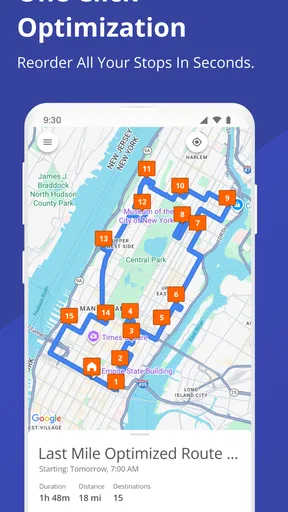
Route planning has two different kinds of speed: how quickly I can turn a list of destinations into a workable order, and how smoothly I can follow that plan once I am on the road. The app’s appeal is that it can optimize the order of multiple stops, so I do not have to guess whether my first idea is the most sensible sequence. That can save planning effort even when the drive itself is affected by traffic, parking, or a stop that takes longer than expected.
I would still treat an optimized route as a useful starting point, not a promise that the day will run perfectly. A route can be efficient on paper and still need adjustment when a customer is unavailable or an errand becomes urgent. The practical benefit is having an organized plan to work from, rather than spending time manually rearranging every address before leaving.
When the workload gets busy
The strongest fit is a day with enough destinations that their order matters. A courier preparing several drop-offs, a tradesperson visiting customers in different neighborhoods, or a parent combining school pickups with errands can all benefit from putting the stops into one plan. For a one-off trip with only one destination, the extra planning may not be worth it; a familiar navigation app is often simpler.
A useful habit is to gather the full list of stops before starting, then check the suggested order against real-world constraints that only I know: a time-sensitive appointment, a place I need to visit before it closes, or a stop where parking is usually difficult. Optimization can reduce unnecessary backtracking, but it cannot decide which appointment matters most to me. Reviewing the sequence before setting off is a small step that can prevent a technically efficient route from being inconvenient in practice.
Reliability is more than reaching the next turn
For repeated routes, continuity matters. Route4Me is made by Route4Me, Inc, and its route-planning focus is more relevant to organized multi-stop days than to casual browsing for nearby places. Its rating averages 4.4 from around 15,000 ratings, and it has passed 500,000 installs. Those figures suggest a well-established audience, though they do not tell me whether a particular route will suit my schedule or local roads.
I would also keep a simple fallback in mind: retain the address list somewhere accessible and check the next stop before driving. That is sensible with any navigation tool, especially on a busy day when a missed turn or an unexpected interruption can break the rhythm. A planner can organize the work, but I still need to pay attention to road signs and use safe judgment rather than treating a screen as infallible.
Worth Reading Before You Choose

EA SPORTS FC Mobile 26 Is a Bigger Football Game, but It Takes Time

Flipboard Shows What News Apps Must Do Beyond the Feed

Switching to Android Auto Means Rethinking Your Driving Routine

Google Calendar Makes a Crowded Week Easier to Manage

Ludo King Makes the Most of the Minutes Between Plans

Baby Panda World Brings Quick Play to Modern Phones, but Its Game Library Feels Busy
Device fit and cost expectations
The app is free to download and is rated for Everyone. It is currently at version 5.1.1 and requires operating system version 9 or later. That makes the basic compatibility question straightforward: check the operating system on the phone or tablet you plan to use before relying on it for work. If the device is older or already struggles with navigation apps, a route planner may feel less convenient simply because switching between destinations is part of its everyday use.
There are in-app purchases, ranging from one dollar to $319.99 per item, so “free” describes the download, not necessarily every paid option. I would start by checking what the free experience covers for my own route volume and workflow before buying anything. A person planning occasional errands may have very different needs from someone organizing routes for a regular job, and the higher end of that purchase range is a reason to understand the value of an option before committing.
My performance verdict is that Route4Me is most compelling when the challenge is coordinating several stops, not when I simply need directions to one place. It can make the planning stage more orderly and reduce the mental work of choosing a sequence, while the real trip still depends on conditions and decisions outside the app. I would try it for a genuine multi-stop day, assess whether its workflow saves me effort, and keep a backup way to view my addresses.
Have you ever been on the brink of a meltdown because your GPS just decided it was the perfect time to take you on a scenic tour of the city when you had somewhere important to be? Yeah, me too. That's why I was beyond thrilled to get my hands on the Route4Me Route Planner app, which promises to make those days a distant memory.
Getting Started with Route4Me
First things first, setting up the app was a breeze. After downloading it from the app store, which was as quick as you’d hope, I was greeted by a clean and intuitive interface. The app didn’t bombard me with unnecessary steps; instead, it guided me smoothly through setting up my first route. You know, the kind of seamless experience that makes you think, "Wow, they really thought this through."
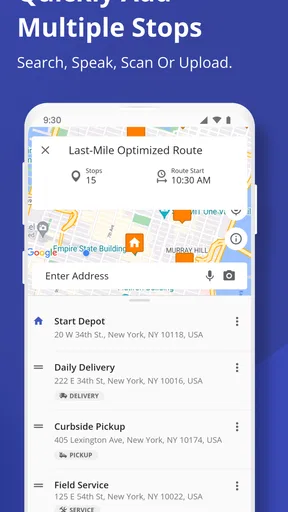
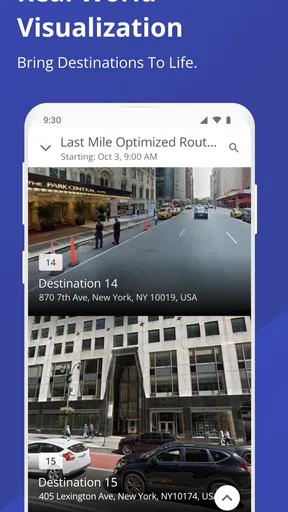
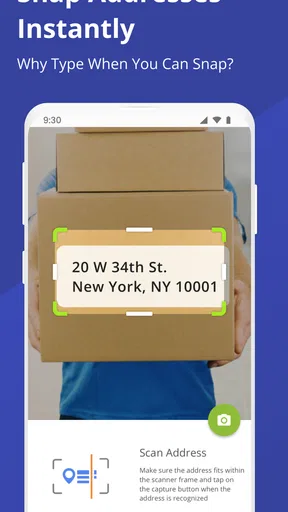
What immediately struck me was how user-friendly everything felt. Adding stops to my route was as simple as typing in addresses or even just the name of a place. Plus, you can add multiple destinations in one go. This feature is a lifesaver for anyone who has ever had to plan a day full of errands. The app even optimizes the order of your stops to ensure you’re taking the most efficient route. Talk about a game-changer!
Features That Stand Out
Let’s talk about some of the nifty features that make Route4Me Route Planner stand out from the pack. One of my favorites is the "Avoidance Zones" feature. Say you know there’s construction or a bad traffic area; you can easily mark these zones, and the app will reroute you around them. It’s like having a personal traffic whisperer in your pocket.
Another cool feature is the ability to sync across devices. Whether you’re on your phone or tablet, your routes come with you. This is particularly handy for people like me who like to plan things out on a bigger screen and then switch to mobile when I’m on the go.
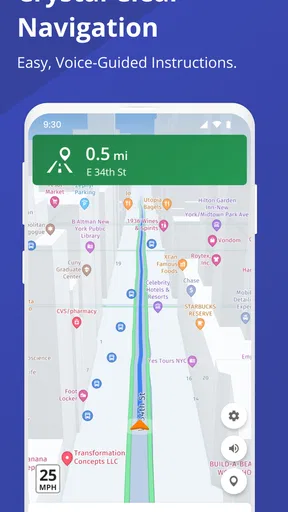
Oh, and did I mention the app supports voice-guided navigation? It’s like having a friendly co-pilot who never gets tired of telling you where to go. And if you’re worried about losing data, Route4Me offers cloud backup, keeping all your routes safe and sound.
Real-World Use: A Day in the Life
Picture this: It’s a busy Saturday, and I have a list of things to do that’s longer than my arm. I enter all my stops into Route4Me, and within seconds, I have an optimized route that saves me time and gas. As I make my way through each stop, the app updates my ETA based on real-time traffic conditions. It’s like having a personal assistant who knows exactly what’s happening on the roads.
One thing I really appreciate is how the app keeps me informed without overwhelming me. The notifications are timely and relevant, never crossing that line into "annoyingly persistent" territory. It’s a delicate balance that Route4Me manages beautifully.
Wrapping It Up
After spending some quality time with the app, I can confidently say it’s a must-have for anyone looking to make their travels more efficient. The combination of its ease of use, powerful features, and real-time updates makes it a standout in the navigation app world.
Whether you’re a delivery driver, a busy parent, or just someone who dreads the chaos of unplanned routes, this app has something to offer. So, do yourself a favor and give it a try. It might just become your new best friend on the road.
And hey, if you’re ready to transform your travel experience, you can download the app from the app store. Trust me, your future self will thank you!
Pros
- User-friendly interface simplifies route planning.
- Supports multiple stops efficiently.
- Real-time traffic updates enhance accuracy.
- Customizable route options for flexibility.
- Integrates with GPS apps for seamless navigation.
Cons
- Subscription required for advanced features.
- Occasional app crashes reported by users.
- Limited offline functionality.
- Battery drain can be significant.
- Learning curve for new users.
FAQs for Route4Me Route Planner
What is Route4Me Route Planner and how does it work?
Route4Me Route Planner is a navigation app designed to optimize routes for delivery drivers, sales representatives, and field service workers. By inputting multiple addresses, users can generate efficient routes that save time and fuel. The app uses advanced algorithms to consider traffic conditions, roadblocks, and other factors to ensure the quickest route possible.
Is Route4Me Route Planner available for both Android and iOS devices?
Yes, Route4Me Route Planner is available for download on both Android and iOS platforms. Users can access the app through the Google Play Store for Android devices or the Apple App Store for iOS devices, ensuring compatibility across a wide range of smartphones and tablets.
Does Route4Me Route Planner offer real-time traffic updates?
Indeed, Route4Me Route Planner provides real-time traffic updates to help users navigate around traffic jams and other road obstacles. By using up-to-date traffic data, the app recalculates routes as necessary to ensure the most efficient travel, saving users time and reducing fuel consumption.
Can Route4Me Route Planner be used offline, and what features are available in offline mode?
Route4Me Route Planner offers offline capabilities, allowing users to access previously saved routes without an internet connection. While real-time traffic updates are not available offline, users can still follow the pre-calculated routes and access basic navigation features, making it useful in areas with poor connectivity.
Are there any subscription fees or in-app purchases associated with Route4Me Route Planner?
Route4Me Route Planner offers both free and premium subscription plans. While the free version provides basic route planning features, premium subscriptions unlock advanced functionalities such as unlimited route optimization, access to real-time traffic data, and enhanced customer support. Users can choose a plan based on their needs and budget.


